Revision note (2026-09-30): This article records work from 2026-08-19. Early proxy designs, sample measurements, and evidence about the original algorithm are distinguished below. Pending work retains its historical validation scope. Later progress is covered in heightmap reconstruction and POI, Stamp, vegetation, and rock layouts.
RuntimePCG development retrospective · Editor and layout workflow · Phase 1: height production, Recipe asset boundaries, and POI placement-result validation
Earlier articles covered terrain-mechanism ownership and the C++ migration. The former separated Recipe, Region, HeightGroup, Stamp, and surface-material responsibilities in the reference target. The latter, From Rules to World: C++ Runtime Verification for Procedural Terrain, verified height output for identical Seeds and brought 4K-class heightfield generation into an acceptable engineering range.
The earlier reconstruction article also outlined the UE5 editor path, including Recipe design, Landscape Import, and staged validation. This article reviews the implementation itself: generation with no visible feedback, confusion among Landscape Actor identity, Import Map keys, and Edit Layer identity, a height-exaggeration control that worked in the wrong direction, a material asset that existed while the viewport still showed the checkerboard fallback, and camera placement overwritten by editor-state restoration.
Passing the C++ algorithm tests was only the start. A tool that artists can use repeatedly also needs interaction, asset, transaction, and validation workflows.
The editor must show the scene implied by a Seed, make the effect of parameter changes on ridges, plains, and standable areas visible, support further Landscape editing and Recipe persistence, and report what happened when identical inputs are generated again. Heightmap output and array tests alone cannot verify those behaviors.
RuntimePCG Phase 1 connects parameter editing, live preview, Landscape generation, and in-scene validation in UE 5.8. The test map is EditorDemo. Editor and runtime share the deterministic height core, while separate output backends handle their different lifecycles. Recipe reading is implemented; explicit Save/Apply is still being designed and is not counted as complete.
The target state is for one Resolved Recipe and Seed to explain preview, Landscape, and runtime results. The height core and parameter semantics are already shared, but the editor does not yet reuse the runtime Recipe resolver.
This article focuses on editor-time terrain production while also including the downstream POI placement result in end-to-end validation. Here, POIs are evidence that generated terrain can accept a visible spatial layout; this article does not explain candidate generation, terrain-fit scoring, spacing constraints, conflict resolution, or retry logic. Those placement algorithms, together with Runtime Tiles, POI Cell lifecycles, Dedicated Server behavior, and network repair, will be covered in later articles.
Current status:
| Status | Scope |
|---|---|
| Implemented | Parameter panel, 256² same-generator preview, production Landscape generation and replacement, selection feedback, basic material, and Recipe reading; generated-object lookup still relies on a Label prefix |
| Verified | Deterministic fixtures, legal Landscape dimensions, basic Undo/Redo, official height brushes, and repeated output from identical parameters |
| Validation pending | Metric consistency between 256² preview and production resolution; residue checks for LandscapeInfo, textures, collision, and Package Dirty across Undo/Redo; target-layer writes, visibility, and stack restoration for Edit Layers |
| In design | Explicit Recipe Save/Apply, editor reuse of the runtime Resolved Recipe chain, Art Layer-safe regeneration, and a TGGeneratedTerrain + TGSlot + GenerationMetadata identity protocol |
| Not implemented | Weightmaps, the LayerInfo production pipeline, procedural vegetation, and navigation baking |
Part I: Define the Production Boundary
Editor Production Scope
Separate editor and runtime responsibilities
The project began with two validation targets:
EditorDemo: artists adjust parameters, inspect a preview, and generate a Landscape that remains editable;RTDemo: terrain is generated from a Seed during match startup and remains consistent across clients and the Dedicated Server.
The two targets use separate backends.
UE5 Landscape is a complete editor production system. After height import, it must integrate LandscapeComponents, materials, Edit Layers, vegetation, navigation, and offline build data. It is well suited to turning a heightfield into an editable, saveable, bakeable level asset. A dynamic 2 km terrain created during match loading has different constraints: the server owns authoritative collision, while clients need tiled submission and local repair. Runtime Landscape APIs were not designed around that combination.
Generate Landscape therefore does not move directly into BeginPlay. The backend split is shown below.
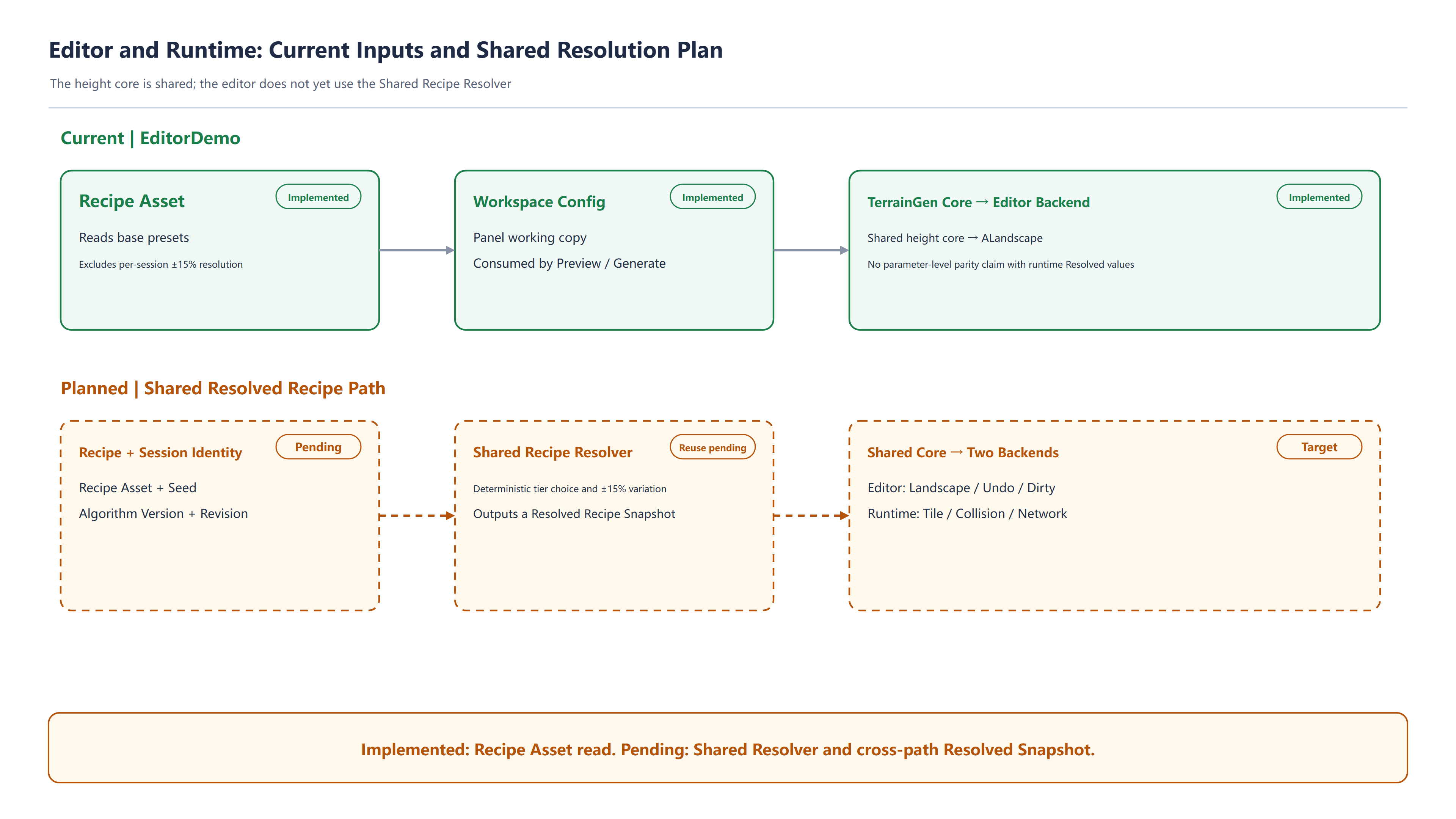
Both paths share input semantics and height computation, but they produce different objects and follow different lifecycles. The editor path creates an ALandscape; the runtime path consumes an authoritative 4097² field and divides it into Tiles.

This screenshot comes from the RTDemo integration map and is used to inspect the TerrainGen panel, production Landscape, 2D preview, and Outliner state together. The TerrainWorldActor in the screenshot is a runtime integration object and is outside the EditorDemo completion scope. The editor backend still produces the Landscape named ProcTerrain_s20260701_slot.
TerrainGen computes height from the inputs. The editor backend converts the heightfield into a production asset. The runtime backend handles submission, collision, synchronization, and repair. Preview shading does not reshape height, Landscape Import does not define Recipe morphology, and runtime Tiles are not an editor asset format.
| Layer | Authoritative input | Output | Lifecycle |
|---|---|---|---|
| Recipe Resolver | Recipe Asset + Seed + Algorithm Version | Resolved Recipe Snapshot | Available at runtime; editor reuse is pending |
| Deterministic core | Resolved Recipe Snapshot | Heightfield in meters | Pure and repeatable computation |
| Editor backend | Heightfield + Landscape dimension contract | ALandscape, material, and asset state |
Transactions, Undo, Dirty state, saving |
| Runtime backend | Authoritative full field + session configuration | Tiles, collision, and digests | Loading, cancellation, submission, and online repair |
The panel supports parameter experiments; it does not duplicate the full configuration model
The browser prototype placed all R5-S6 stages and parameters in one interface. R5-S6 is the currently frozen deterministic terrain Recipe version, and each parameter change could be related directly to a generation stage. After moving to UE, keeping only the DataAsset and navigating nested fields through the Details panel would have made parameter experiments significantly slower.
Terrain debugging has three recurring characteristics:
- A test usually changes one control, but that control is dragged repeatedly to find a useful range.
- Seeds must be changed often to avoid overfitting one map.
- Generation stages must remain switchable so a defect can be assigned to the foundation, HeightGroups, Stamps, or spectral surface.
The editor panel therefore keeps the experimental rhythm of the browser prototype. A Seed can be entered, randomized, or stepped backward and forward. The visible stage can switch among Foundation, Height, Sandy, and Final. Region5 controls, height transitions, Stamp count and gain, spectral gain, and the later band-flattening and contrast controls all live in the same workspace.
The authoritative core forbids FMath::Rand, but the panel may still expose a Random Seed button. The button only selects a new input. Once the Seed is fixed, generation continues with integer hashes, a fixed traversal order, and double intermediates without additional random choices.
Each slider has a numeric field. The slider searches a range quickly; the field provides exact reproduction. The Seed field shows the complete value so eight-digit fixture Seeds such as 20260701 can be checked manually.
These controls do not alter the algorithm, but they directly affect whether a parameter experiment can be reproduced.
Part II: Build a Sustainable Tuning Loop
Same-Generator Preview, Cross-Resolution Validation, and Explicit Actions
The 256² preview uses the production generator
Importing a Landscape after every slider update would attach the full production cost to every parameter experiment. Live feedback is therefore separated from production generation.
The right side of EditorDemo displays a 256² preview. It still calls FDesertR5S6::Generate; only the resolution is temporarily reduced to 256. The result comes from the same generator at a lower sampling density, not from a separate approximation based on noise.
Sharing the generator keeps algorithm and parameter semantics aligned, but it does not promise pixel identity across resolutions. The preview is used to judge broad structure, stage ownership, and the direction of a parameter change. Small Stamps, slope statistics, and high-frequency surfaces remain sensitive to sampling density. Frequencies, Stamp radii, and world extent are defined in meters and do not scale with pixel count. Formal validation still uses fixed Seeds to compare low-frequency structure, percentile span, and standable-area ratios across preview resolution, the Landscape target resolution, and the 4K fixtures.
The archive does not yet contain a three-resolution comparison table, so 256² is currently defined only as a same-generator preview. p01-p99, low-frequency correlation, standable rate, wall rate, and effective Stamp count still need to be measured across the same fixed Seed set.
If preview and production output use separate implementations, parameter clamps, Stamp integration, or height normalization can drift until the preview can no longer be reproduced by production generation.
Once the 256² field is ready, the tool derives a readable image from it. The panel currently provides three display modes:
- Hillshade estimates normals with central differences and uses a fixed light vector to reveal ridge and slope direction.
- Height grayscale shows broad height distribution without material or lighting interference.
- Slope view checks whether flats, transition zones, and steep slopes occur where expected.
The water overlay uses the p08 percentile of the height distribution and marks low terrain in blue. It supports cross-Seed distribution comparisons; it does not define a physical sea level.
The line below the preview reports Seed, elevation range, p01-p99 span, and Stamp count. The image shows morphology, while the statistics explain distribution changes.
A 0.35-second debounce and an explicit panel lifecycle
A 256² generation is inexpensive, but dragging a slider can still trigger dozens of callbacks per second. Computing every callback queues obsolete work and leaves the interface processing old results after input has stopped.
The panel uses a 0.35-second debounce. A parameter update cancels the preview request that has not yet fired and restarts the timer. Computation begins only after the input has remained stable for 0.35 seconds. The current 256² preview completes synchronously in the Ticker callback, so cancellation only removes an untriggered timer. If generation moves to a background task, a GenerationId and input digest will also be required to reject stale writebacks.
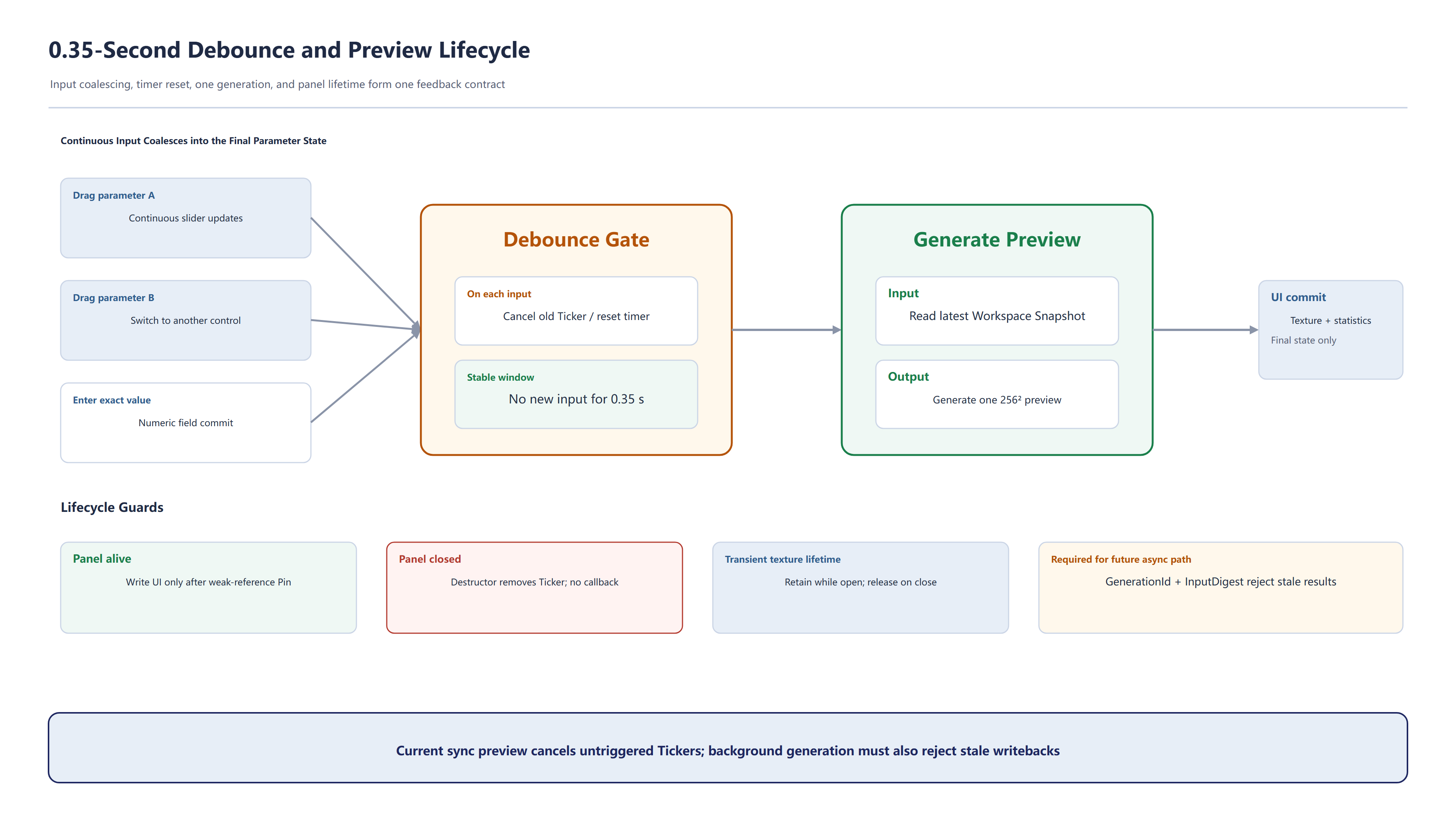
Debouncing skips intermediate drag states that were never accepted. Once input stops, only the final parameter set is evaluated.
After the panel closes, Ticker callbacks must not retain destroyed Slate widgets, and the transient preview texture must not be collected too early. Preview requests access the panel through weak references. The destructor removes the Ticker, while the transient UTexture2D is retained explicitly for the panel lifetime and released on close.
None of this changes the terrain algorithm, but it determines whether the tool can survive beyond a one-off demo.
Preview, Generate, and Save/Apply have different responsibilities
An early design updated the scene Landscape whenever a parameter changed. That combined three operations with different costs and side effects.
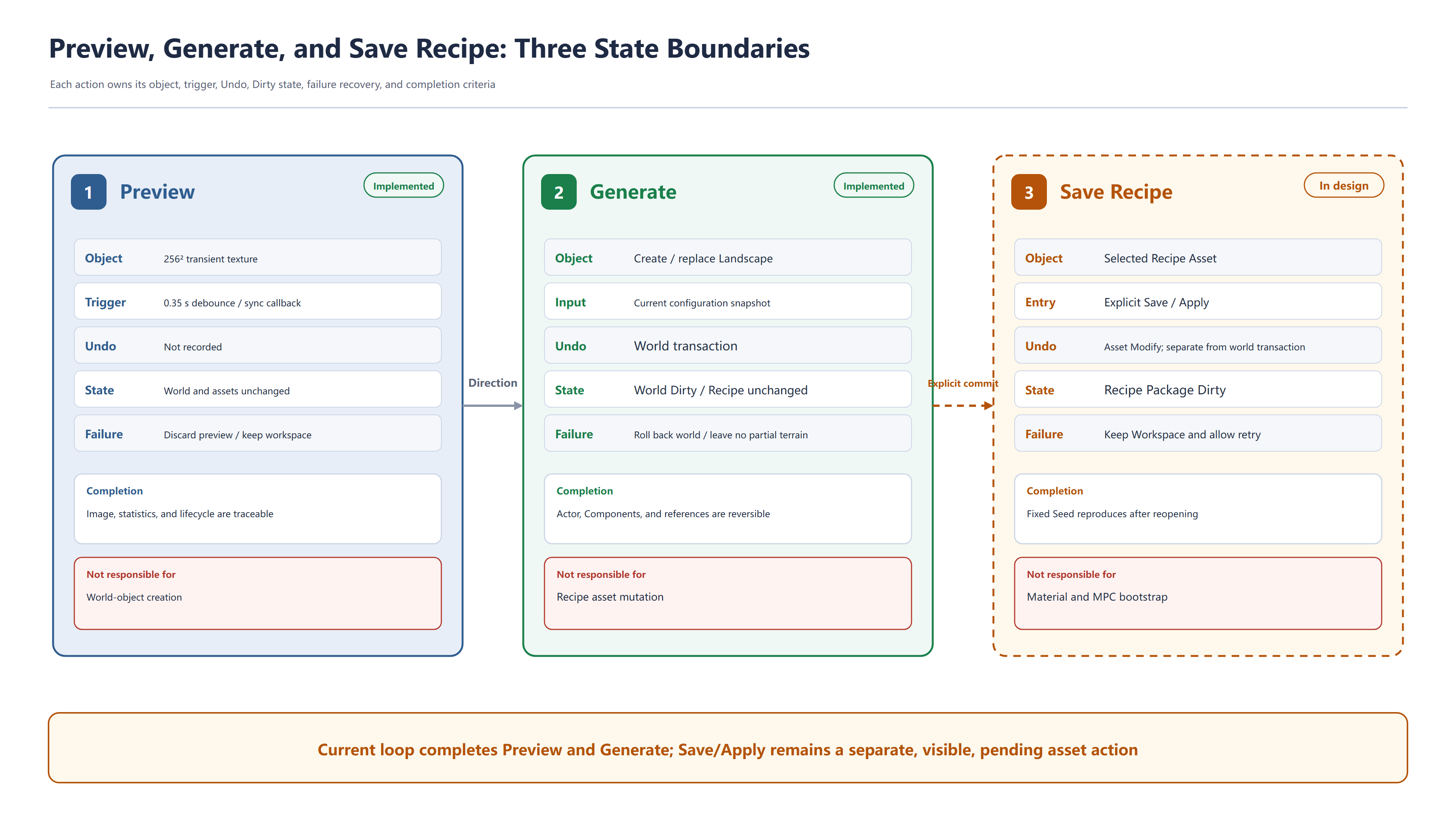
The interface now separates them:
- Preview is low-resolution, transient, and disposable. It supports parameter exploration.
- Generate creates a production Landscape from the current values and enters the scene and Undo lifecycles.
- Save Recipe or Apply to Recipe will explicitly write accepted inputs to an asset for later reproduction and runtime use.
Phase 1 implements Preview, Generate, and Recipe reading, but not asset writeback. Dragging controls updates only the preview. Generate Landscape modifies the world, records an Undo transaction, and creates a Landscape without changing the Recipe DataAsset. The future Save/Apply action will call Modify() on the asset and mark its Package Dirty. World transactions and Recipe mutations remain separate operations.
Generation is disabled during PIE. An editor world and a game world coexist during a Play Session; an incorrect World reference could import or destroy the Landscape in the wrong world.
The split also gives each failure a clear owner. Preview failure discards a transient texture. Generate failure should roll back its world transaction without leaving a partial Landscape. A future save failure should preserve the panel workspace so the user can retry or discard it. A single Apply button would make those states ambiguous.
Part III: Write the Heightfield into Landscape
The Landscape Data Contract
Legal dimensions and sampling conventions
R5-S6 defines a bounded 2048 m × 2048 m world. Landscape vertex counts, however, must follow its Component, Section, and Quads rules. The editor backend currently uses 63 quads per Section and one Section per Component.
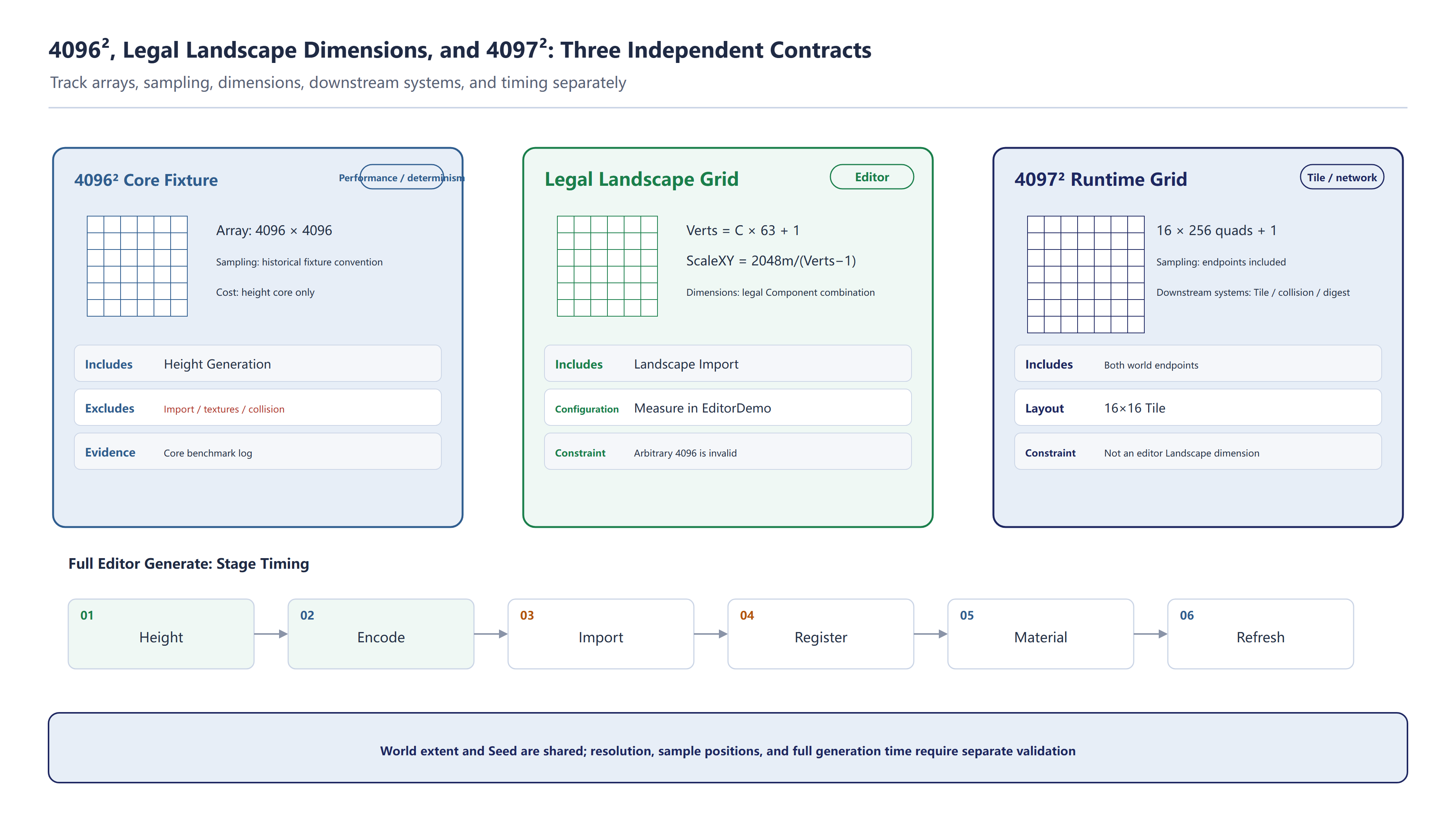
Verts = ComponentCount × SectionsPerComponent × QuadsPerSection + 1
MetersPerVertex = WorldSizeMeters / (Verts - 1)
LandscapeScaleXY = MetersPerVertex × 100
For example, four Components produce 253² vertices. The sample extent and meters per vertex are derived from the fixed 2048 m world and target grid; they are not independent panel settings. An earlier interface exposed world size, sampling rectangle, and MetersPerVertex simultaneously, making it easy for the generator domain, Landscape samples, and world scale to disagree.
The product currently uses a fixed 2 km map, so world extent is part of the generation contract rather than an adjustable default. Removing redundant fields also removes contradictory configurations.
Both 4096² and 4097² appear in the project. The former is the sample size of the C++ core performance fixture and preserves the historical benchmark. The latter is the runtime vertex grid: 16 Tiles at 256 quads each require 16 × 256 + 1 = 4097 endpoint-inclusive vertices. Editor Landscape must choose another legal vertex count from its Component rules. The three cases share the world extent and generation semantics, but their array dimensions belong to different contracts.
The 4096² performance result measures only deterministic height-array generation. It excludes ALandscape::Import, Component registration, Heightmap texture creation, material-instance updates, collision construction, and transaction recording. A complete editor Generate must time Height Generation, Height Encoding, Landscape Import, component and collision registration, material update, and editor refresh separately. Core-fixture time cannot stand in for the production pipeline.
The current archive confirms only the 2048 m world extent, 63 quads per Section, and one Section per Component. ComponentCount X/Y, actual vertex count, final MetersPerVertex, LandscapeScaleXY, and stage timings for a complete Generate were not archived with the EditorDemo acceptance result. This article therefore does not infer those values or claim that a complete editor Generate has passed a performance gate. The next EditorDemo run should record them directly.
Sampling positions introduce another distinction. R5-S6 is a bounded grid generator that outputs N×N pixel-center samples. Landscape vertices sit on an endpoint-inclusive regular grid. If the generator uses x=(i+0.5)/N, changing N alone does not produce endpoint samples at x=i/(N-1).
The current backend preserves center-sample semantics. It asks R5-S6 for the vertex count required by Landscape, then writes those samples as vertex heights. The sampled domain is inset by about half a cell on each side. Writing it directly to an endpoint-inclusive grid stretches that inset domain across the full Landscape. Error is largest at the edges and approaches zero near the center, so it is not a uniform half-cell offset that can be removed with one Actor Origin translation.
This path preserves the same Recipe, Seed, and broad structure, but it is not yet coordinate-identical to either the 4096² fixture or the 4097² runtime grid. If POIs, roads, or runtime Tiles must exchange data point-for-point with editor assets, the generator will need an endpoint-sampling mode or an explicit resampling step, followed by new fixtures for an analytic plane, a one-way slope, the four corners, center, and world boundaries.

Absolute height encoding and metric scale
The algorithm outputs meters; Landscape Import accepts uint16 heights. Normalizing every heightmap from its own minimum and maximum into 0–65535 would make the same 20 m value map to different encoded values and world heights in different Seeds.
EditorDemo uses Landscape absolute-height encoding. The core conversion in the current UE5.8 path is:
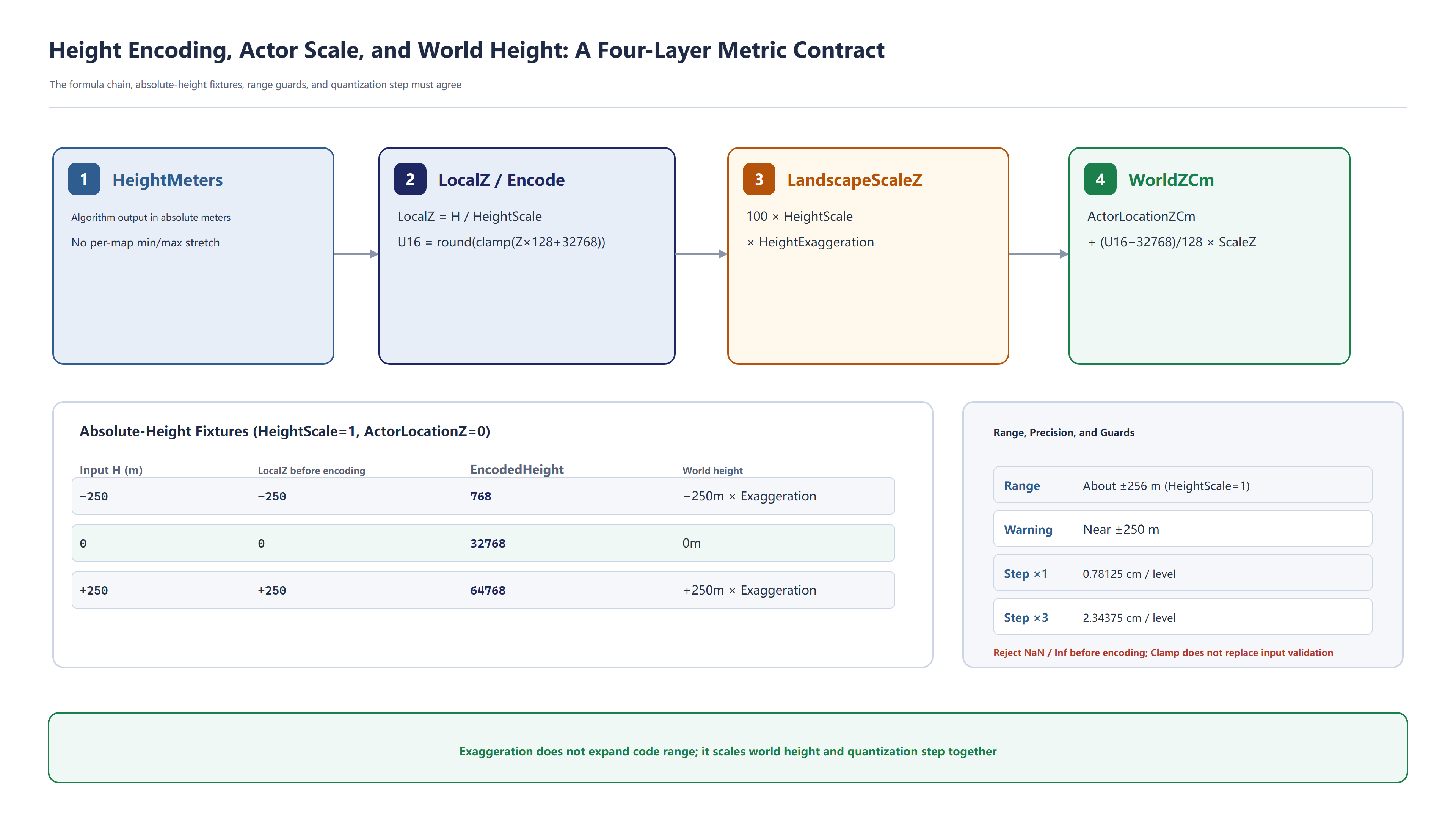
LocalZ = HeightMeters / HeightScaleMetersPerUnit
EncodedHeight = round(clamp(LocalZ × 128 + 32768, 0, 65535))

LandscapeScaleZ =
    100 × HeightScaleMetersPerUnit × HeightExaggeration

WorldZCm =
    ActorLocationZCm
    + (EncodedHeight - 32768) / 128 × LandscapeScaleZ
LandscapeScaleZ=100 maps one local Landscape Z unit to 100 cm in world space. XY uses LandscapeScaleXY=MetersPerVertex×100. With HeightScaleMetersPerUnit=1 and ActorLocationZCm=0, the expression reduces to WorldHeightMeters=HeightMeters×HeightExaggeration. The heightfield is not stretched from a per-image min/max. Exaggeration is represented only by Actor Z Scale: 1.0 is metric scale, and 3.0 is triple vertical scale.
An earlier implementation divided height by the exaggeration factor while keeping Z Scale fixed. Increasing the control flattened the terrain. The output still had relief, but its response contradicted the label and was easy to miss in an ordinary visual check.
Absolute encoding has a finite range. With HeightScaleMetersPerUnit=1, this path represents roughly ±256 m of data height. Clamped values appear as cut-off peaks or valley floors. Current R5-S6 output does not reach that limit, but the backend warns near ±250 m and rejects NaN/Inf before encoding.
Height exaggeration does not consume more of the 0–65535 code range, but it magnifies the world-space height represented by each quantization step. With HeightScaleMetersPerUnit=1, the step is about 0.78125 cm at HeightExaggeration=1 and about 2.34375 cm at triple exaggeration. Manual edits made with official brushes at triple Z Scale follow the same scaled semantics. Until Art Layer-safe regeneration and runtime writeback are productized, such edits cannot be treated directly as deltas to a metric-scale Recipe.
The conversion was originally audited against LandscapeDataAccess.h and LandscapeEdit.cpp in UE 5.7.4. After EditorDemo moved to UE5.8, the workspace did not archive a corresponding source-review record. The ±250 m warning is a project-backend guard, and NaN/Inf must still be rejected before the helper call. The formula is retained here as the current implementation contract, but the older file locations are not presented as UE5.8 re-verification evidence.
The runtime path also uses R16, but with different semantics. Runtime R16 is normalized by per-session ZMin/ZMax for Tile storage and network repair. Editor R16 expresses Landscape absolute height. The formats are not interchangeable.
| 16-bit data | Encoding basis | Required for decoding | Primary use |
|---|---|---|---|
| Landscape height | Engine-defined absolute zero and local height ratio | Landscape Actor Scale | Editor assets and official terrain tools |
| Runtime R16 | Per-session ZMin/ZMax normalization |
Session quantization range | Tile mesh, collision, digests, and Repair |
An interface should not pass an unqualified TArray<uint16>. Even when the C++ type is identical, function names, wrapper types, or assertions should identify the encoding so valid data is not handed to a semantically incompatible consumer.
Import, Edit Layer, and object identity
At Landscape Import, the problem moves from numeric conversion to engine-object lifecycle.
Landscape Import involves three identities that must remain separate:
| Identity | Purpose | Value in the current call |
|---|---|---|
| Landscape Identity GUID | Identifies the new Landscape Actor | A valid new GUID |
| Import Height/Material Map Key | Identifies the final height and material-layer sets in the import envelope | Both Maps use an empty FGuid() |
| Edit Layer Identity | Identifies the Landscape edit layer created or selected after Import | Generated by the default-layer path; not the empty Map Key above |
Using the Landscape Identity GUID as the height Map Key fails in the FindChecked(FGuid()) path in LandscapeEdit.cpp. The empty FGuid() is a special key in the Import data structure; it is not the GUID of the default Edit Layer.
The height Map and material-layer Map must contain the same number of entries. Even without imported weightmaps, an empty material-layer array must be inserted under the same empty FGuid() Map Key. Empty data is not the same as a missing slot, and the key still does not identify an Edit Layer.
The current backend uses ALandscape::Import as a creation path and calls it only on a blank Landscape without LandscapeComponents. Generate therefore replaces the Actor rather than repeatedly importing into an existing object. UE editor code has other paths for overwriting the height of an existing Landscape, but they are outside this backend phase. The current API choice is not a limitation of the full Landscape system.
Import establishes LandscapeInfo, registers Components, and creates the default layer, so the backend does not initialize those again. The exact call contract must still be checked against the current engine source rather than inferred from an unchanged API name.
The statement that Import creates a default layer is conditional. The current call enables Edit Layers, supplies no existing Import Layers, and starts with an empty layer list. Under those conditions, the engine enters CreateDefaultLayer() and selects layer 0. If the backend later imports predefined layers, both default-layer creation and selected-layer behavior must be revalidated.

An imported ALandscape still needs behavioral validation. Basic acceptance checks height changes from raise/lower, smoothing, and sculpting, plus synchronized viewport, collision, and Dirty-state updates. Edit Layers require separate checks: the target layer exists, the active layer is correct, brushes write into it, and hiding it restores the expected result. Basic brush acceptance does not cover that contract.
Official height brushes have passed the basic check, and the current Import conditions have been confirmed to take the default-layer creation path. Target-layer writes, visibility, and layer-stack restoration do not yet have an independent validation record and are not listed as verified capabilities.
Material-layer painting and procedural vegetation are also outside this phase. The current material derives its appearance from height and slope rules. Vegetation should follow a procedural distribution system; the missing Weightmap/LayerInfo workflow is not presented as complete.
Generated-Object Lifecycle and Identity
Generate uses replacement semantics
Early button tests added a new Landscape on every generation. That was useful for batch comparisons but unsuitable for production level editing because it created overlapping terrain, duplicate collision, and unclear version ownership.
Each generation slot now keeps one procedural terrain. The prototype finds and destroys the old object with ActorLabel.StartsWith("ProcTerrain"). This can miss a user-renamed object or match a hand-authored Landscape with the same prefix, so it remains a temporary implementation.
Destruction and creation both occur inside an FScopedTransaction. The old object calls Modify, and the new object also joins the transaction, so Ctrl+Z restores the previous terrain through normal editor transaction semantics.
After a successful generation, the tool selects the new Landscape and shows its selection outline in the viewport. Repeating identical parameters produces identical terrain in the same place; selection feedback makes it clear that the operation completed.
The backend computes an output fingerprint from the height array, Component count, and height exaggeration for a quick comparison with the previous result. This Hash does not prove that the inputs were identical and is not equivalent to direct array comparison. Full diagnosis needs two digests. InputDigest covers Seed, Resolved Recipe, algorithm version, sampling convention, and the Component/Scale contract. OutputDigest covers height data, dimensions, and encoding convention. Bitwise reproduction still requires equal InputDigests and direct array comparison in tests. The UI reports only whether the current output fingerprint matches the previous one.
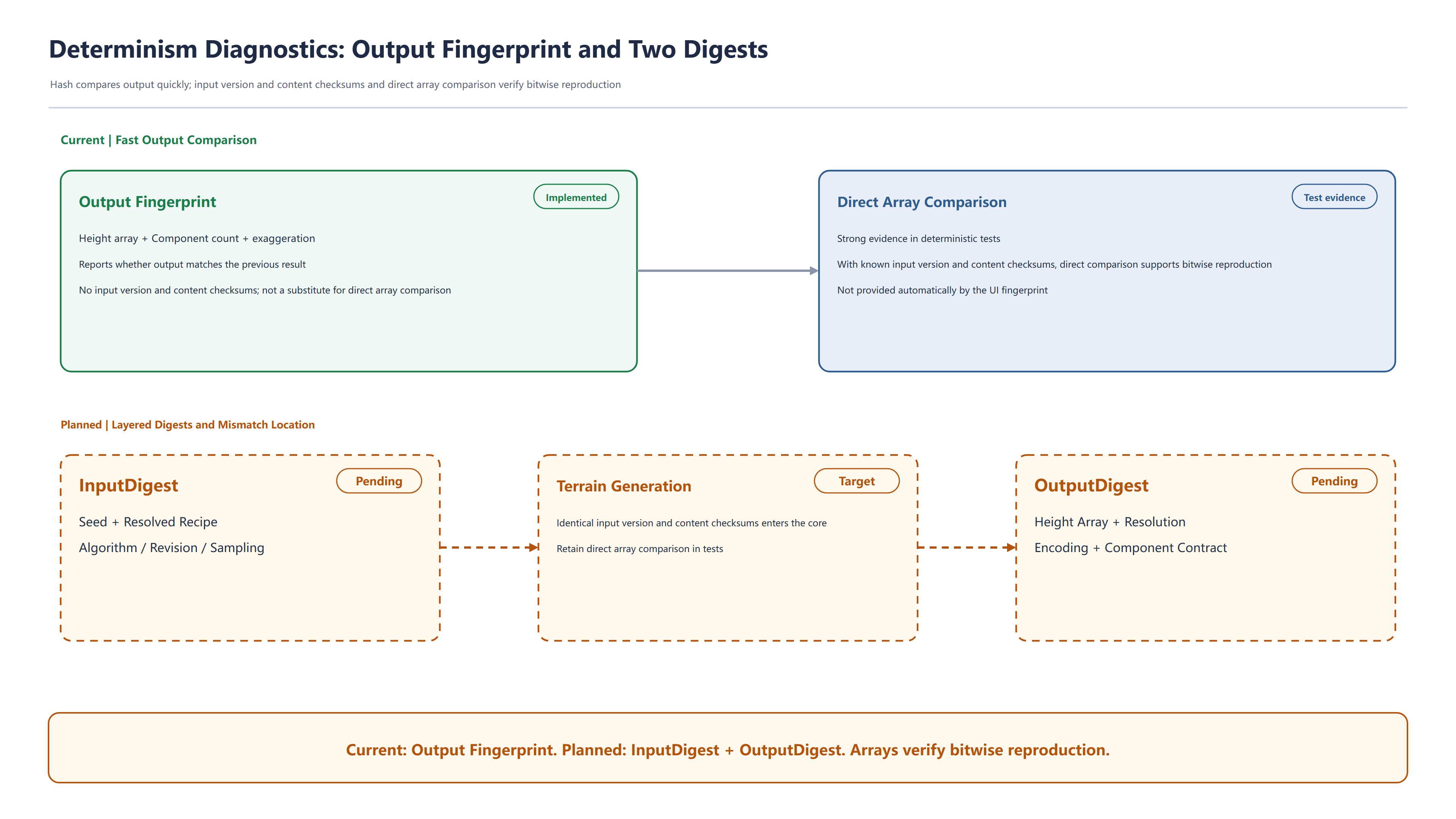
Basic acceptance confirms that Ctrl+Z and Ctrl+Y restore the corresponding Landscape Actor in the Outliner. Complete Undo/Redo validation must also show that Ctrl+Z restores the old Landscape and removes the new Actor and Components, while Ctrl+Y recreates the new state without orphaned LandscapeInfo, Heightmap textures, or duplicate collision.
The next validation pass should record Landscape Actors, LandscapeComponents, LandscapeInfo, Heightmap/Weightmap references, world Package Dirty, and collision-object counts at four points: before Generate, after Generate, after Undo, and after Redo. Because Generate is separate from Save/Apply Recipe, Recipe content and Recipe Package Dirty must remain unchanged throughout. Until that record exists, only Actor-level Undo/Redo is claimed as verified.

Label, Tag, and generation metadata
The new Landscape Label contains the Seed, for example ProcTerrain_s20260701_slot. The _slot suffix prevents the editor’s unique-name logic from rewriting the final Seed digits when resolving duplicates.
Actor Label is not a tool identity. The backend already writes a TGSeed=<Seed> Actor Tag, but complete identity also requires Recipe, algorithm version, Component count, sampling convention, and height exaggeration.
The next step is to identify procedural terrain with TGGeneratedTerrain and TGSlot=<SlotId> and remove Label-prefix lookup from Generate. A production implementation can use a dedicated component or AssetUserData to record Recipe Asset/Id, Resolved Recipe Digest, Algorithm Version, Sampling Convention, Component Count, Height Encoding, Height Exaggeration, and Output Digest. Tags support lightweight filtering; generation metadata records provenance.
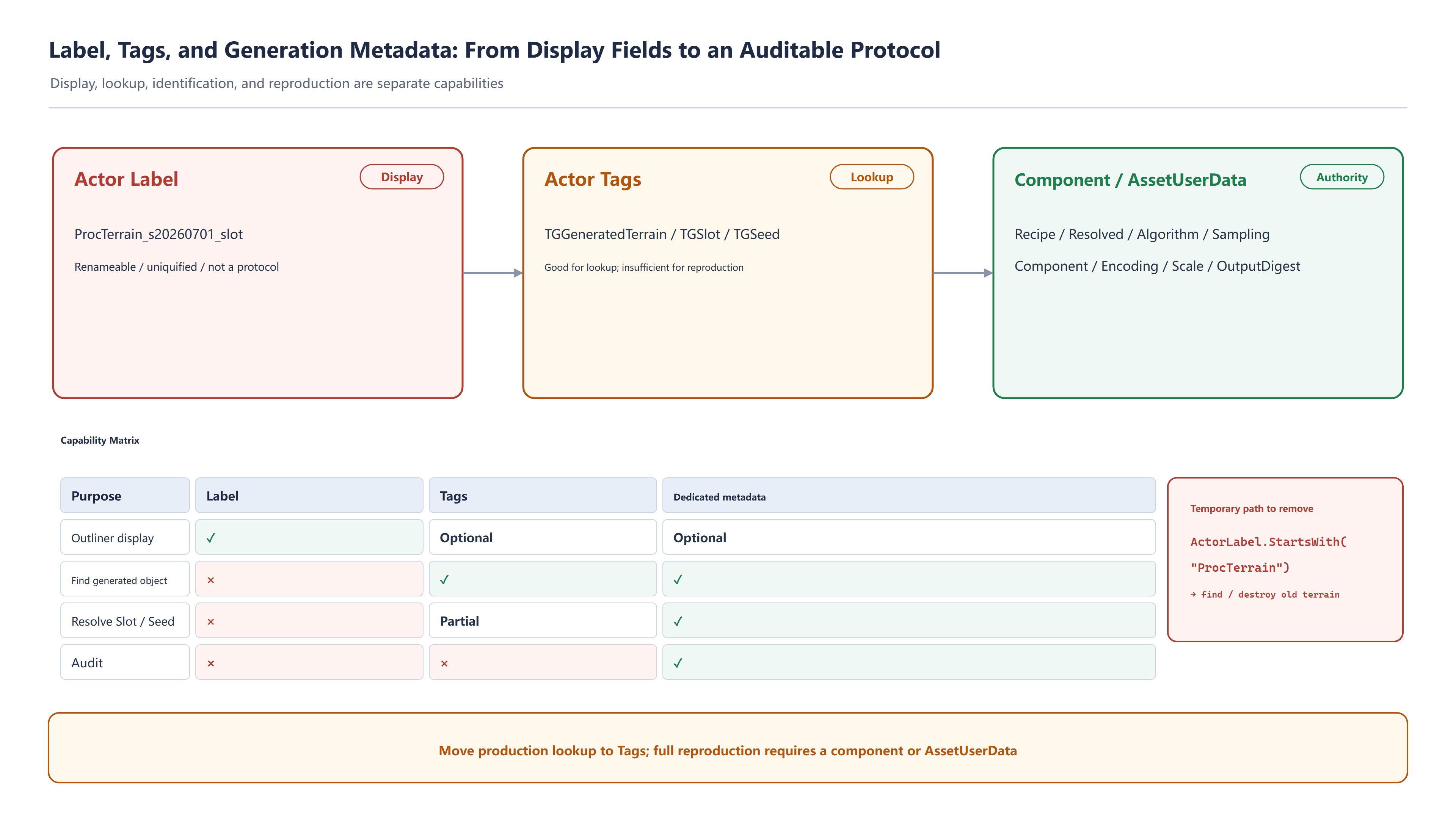
A value that can be renamed by a user, uniquified by the engine, or localized should not serve as protocol identity.
Part IV: Bring Generated Results into Asset Management
Readable Output and First-Run Experience
The material is for structural inspection
EditorDemo uses a simplified procedural sand material to make terrain structure readable. World Position Z and the current elevation range drive a three-band gradient: dark green lowlands, gray-green middle elevations, and sand-colored high terrain. Roughness and specular use fixed values.
The material does not add extra slope darkening. Mountains are shaded mainly by geometric normals and directional light. Darkening slopes again can exaggerate steps, bad normals, or flat-area layering and interfere with heightfield evaluation.
After a Material Parameter Collection is created programmatically, the editor change sequence must rebuild its Uniform Buffer structure. Expression nodes referencing parameters also need the correct ParameterId. Missing either step causes material compilation to fall back to the checkerboard.
Assigning the material to LandscapeProxy is not sufficient. Each LandscapeComponent material instance must be updated and the Component re-registered before the checkerboard disappears from the viewport.
A material that “did not apply” may have failed at asset registration, Uniform Buffer construction, expression parameters, component instances, or viewport refresh. Each layer must be checked; repeatedly assigning the same property does not locate the break.
Engineering evidence index
Engine conclusions in this article are labeled by evidence source:
| Conclusion | Current evidence | Location or entry point | Publication status |
|---|---|---|---|
| Landscape absolute-height encoding | UE 5.7.4 source audit | LandscapeDataAccess.h / LandscapeDataAccess::GetTexHeight |
Formula retained; UE5.8 location requires recheck |
Empty FGuid() Import Map Key |
UE 5.7.4 source audit and call sample | LandscapeEdit.cpp / ALandscape::Import lookup path |
Conditional conclusion |
| Default Edit Layer creation conditions | UE 5.7.4 source audit | LandscapeEdit.cpp / CreateDefaultLayer() branch |
Current call conditions documented; UE5.8 recheck pending |
MPC structural refresh and ParameterId |
EditorDemo repair experience | Asset-creation helper and material compile path | Before/after logs not archived |
| LandscapeComponent material refresh | EditorDemo viewport repair experience | Material-instance update and Component re-registration | Call log not archived |
| Undo/Redo | Manual EditorDemo acceptance | Ctrl+Z/Ctrl+Y and Outliner Actor state | Basic validation only; four-stage record pending |
An engine upgrade does not automatically carry old source-audit conclusions forward. Final UE5.8 review should record the engine file, function, current project call site, and either before/after logs or the four-stage acceptance result.
Automatic demonstration and repeatable startup
The early project opened to an empty Entry map, a black viewport, and an empty Content Browser. Reviewers had no direct path to a working result.
The -TerrainAutoGen demonstration entry point now performs four actions after the editor is ready:
- adds Directional Light, Sky Atmosphere, and Sky Light;
- generates the default R5-S6 Landscape through the production backend;
- places the perspective camera where the complete 2 km terrain is visible;
- creates the default Recipe assets and opens the terrain panel.
The demo calls the production FTerrainEditorBackend::Generate directly. It does not maintain a separate demo generator, so the demonstration and panel button exercise the same backend.
The sequence is idempotent. The prototype currently checks the ProcTerrain Label prefix for an existing demo terrain. On a match it does not regenerate or overwrite the Landscape; it only restores the camera and panel. Editor layout and saved viewport state can be restored later in startup and overwrite camera placement, so the current implementation uses bounded retries at intervals. A production version should also limit the total startup window and cancel retries after user viewport input. Label-prefix detection remains temporary.
Two camera presets are available: a full overhead view and a ground-level view. The overhead view can be compared with the broad distribution in the 2D preview. The ground-level view checks ridgelines, platform edges, and real lighting. Two earlier reports of flattened terrain came from a viewport left in Wireframe, so the camera buttons also restore Lit mode. Algorithm tests cannot cover observation state; the tool must include it in acceptance.

This viewport capture shows the Landscape after the editor backend has written it into the scene. It is used to inspect broad height distribution, boundaries, and ground-level forms. The current material supports structural review and is not final art.
Recipe, Validation, and Persistence Boundaries
Recipes converge from code and INI into a DataAsset
C++ defaults are reproducible but unsuitable as the sole production interface. Parameter changes require recompilation, and designers and artists cannot inspect the configuration used by the current map directly.
RuntimePCG Recipes moved from code defaults to INI and then to DA_TerrainRecipes, which is now the persistent Recipe catalog. Four standard tiers cover dune, hill, mountain, and high-mountain terrain, with spans from 1.6 m to 40 m. A tier is selected from the Seed at startup, with up to ±15% deterministic variation.
The EditorDemo preset menu reads the same Recipe asset rather than an editor-only preset table. However, selecting the same mountain tier does not mean that editor and runtime consume identical final parameters. Runtime also applies Seed-driven tier selection and ±15% deterministic variation to the base preset.

The system contains three configuration objects. Recipe Asset stores persistent presets. Workspace Config is the panel’s uncommitted copy. Resolved Recipe is the authoritative generation input for a particular Seed and algorithm version. EditorDemo verifies base-asset reading but does not yet run the same resolver as runtime, so parameter-level equality after the ±15% variation is not guaranteed. Future Save/Apply modifies only the base Recipe and does not write a Seed-specific result back into it.
A shared DataAsset means only that base Recipe parameters share a source. An InputDigest used across editor, client, and server must also include Resolved Recipe parameters, Seed, Algorithm Version, Recipe Revision, and sampling contract. The editor writes Landscape absolute height. Runtime quantizes to session R16 and then divides the field into Tiles. The consumption formats remain different.
Generate Landscape consumes the current configuration without writing the Recipe asset. Planned Save Recipe / Apply to Recipe actions will copy the workspace into a selected Recipe and mark its Package Dirty. Bootstrap Demo Assets creates only missing default Recipes, material, and MPC, and marks new assets Dirty. Neither operation saves on the user’s behalf.
Art Layer regeneration is outside the current scope. An earlier design separated the algorithmic base from an artist Art layer and proposed Regenerate Base Layer so small parameter changes with a locked Seed could preserve manual brushwork. Additive Edit Layers can store the two deltas separately, but they cannot guarantee that manual changes remain meaningful after changing the Seed or rebuilding broad morphology. This article confirms only an editable generated Landscape and a shared Recipe source. Art Layer-safe regeneration is not yet productized.
Four layers of editor validation
EditorDemo acceptance has at least four layers.
The first verifies numeric equivalence. The authoritative JS fixtures cover four Seeds at 256 and 512, for eight cases in total. The maximum absolute error in C++ output is 0.003815 mm, with zero pixels above 1 mm. Preview shading may differ; height semantics may not.
The second verifies metric equivalence. I3, the gameplay-metric acceptance fixture, recomputes five tiers of block height difference, standable rate, and wall rate in C++ using the JS definitions. The largest deviation is 0.005 percentage points. The panel slope view and statistics use the same definitions.
The third covers Landscape engineering behavior: legal dimensions, metric scale, absolute height, replacement of old terrain, basic Undo, selection of the new object, material updates, and repeated generation from identical input. Residue-free asset-level Undo and dedicated Edit Layer validation remain pending as listed in the status table.
The fourth is visual acceptance. A fixed Seed is inspected through Foundation, Height, Sandy, and Final. Multiple Seeds test stability of the Recipe style. The overhead camera checks broad distribution; the ground-level camera checks platform edges and slopes. WP4, the current candidate Recipe batch, once produced rectangular silhouettes from 64 m flattened blocks. Although the metrics passed, the form still required inspection under EditorDemo’s 3D material and real lighting. The candidate was accepted after reviewing both editor preview and runtime captures, and both Recipe variants were retained.
Numeric checks reject explicit errors. Viewport review decides whether remaining shape error is visually acceptable. Neither can replace the other.
Together, the four evidence layers cover formula migration, gameplay distribution, Landscape integration, and final form. A screenshot does not prove pixel identity, and a numeric report cannot decide whether a rectangular step remains acceptable under real lighting.
Stage previews identify which generation layer owns a defect
The R5-S6 panel retains Foundation, Height, Sandy, and Final views to identify the generation layer that owns a problem.
When an unexpected ridge appears in Final, first return to Sandy. If the ridge remains, the problem belongs to Stamps or an earlier stage. If it disappears, inspect the spectral surface. If an incorrect step is already present in Height, Stamp feathering or material color should not conceal it. Foundation inspects the broad continuous base. Height checks discrete HeightGroups and transitions. Sandy checks local forms. Final checks whether the high-frequency surface damages standable areas.
These display stages are editor diagnostics; they do not redefine mechanism ownership in the full recovery pipeline. The actual pipeline still separates Region/SubRegion, continuous foundation, HeightGroups, local residual, and support-conditioned Stamps. Sandy reveals local Stamp morphology; it does not compensate for broad terrain missing from Foundation or Height. POI pads, roads, and runtime displacement are not part of the natural terrain’s Final detail layer.

Stage-based diagnosis prevents later controls from compensating for earlier defects. When foundation heights are too concentrated, adding Stamps only strengthens local discontinuities. When block-constant flattening creates rectangular edges, increasing spectral noise adds surface detail but cannot restore continuity.
The display modes follow the same diagnostic rule. Hillshade makes direction and silhouette easy to read but depends on the fixed light vector. Height grayscale reveals broad distribution without slope direction. Slope view suppresses presentation and directly shows whether gameplay space is being eroded. The percentile water overlay shows changes in lowland area.
The tool provides both presentation and diagnostic views.
From one Seed to a candidate Recipe
Tuning against one Seed invites overfitting. Parameters may create a good dominant peak for 20260701, then concentrate terrain on one side or move the flat-ground ratio outside the target range on another Seed.
EditorDemo does not save immediately after one visually satisfying adjustment. Acceptance follows a fixed sequence:
- Lock an approved regression Seed and inspect each stage for structural defects.
- Switch among height, slope, and hillshade to inspect different properties of the same result.
- Step through adjacent Seeds to check style stability.
- Return to the approved Seed and generate the Landscape.
- Inspect broad distribution from above and ground-level silhouettes from the near camera.
- Record the candidate parameters and run metrics in batch through a Commandlet. Once explicit Save/Apply exists, write an accepted workspace back into the base Recipe.
An approved Seed is a long-lived regression sample, not a value selected for one attractive result. Random Seeds explore the parameter space; fixed Seeds compare results before and after code changes.
The four current Recipe tiers use different height spans for dune, hill, mountain, and high-mountain terrain. The Recipe defines the style axis; the Seed produces instances within a tier. Designers can select terrain character while preserving per-match variation.
The current workflow produces candidate parameters validated by fixed Seeds and batch metrics. A candidate becomes a named, persistent, runtime-consumable Recipe only after explicit Save/Apply and the shared Resolved Recipe chain are complete.
DataAsset is the persistent source; the panel is a workspace
The panel owns the Config currently being edited. The DataAsset owns persistent configuration. Their synchronization direction and commit points must be explicit.
As a workspace, the panel handles dragging, random Seeds, stage selection, and disposable low-cost previews. Selecting a preset loads a tier from DA_TerrainRecipes. Generate sends the current Config into production Landscape generation. Writing the workspace back to a selected Recipe still awaits Save/Apply. Runtime consumes a per-session snapshot resolved from the base asset, Seed, and deterministic variation.
Frequent previews and temporary Generate operations do not mark asset Packages Dirty. Dirty state is reserved for asset changes that require a user save decision.
The project once used code defaults, INI lists, and a DataAsset at the same time. To prevent local INI differences from producing different results across machines, DA_TerrainRecipes is now the authoritative Recipe catalog. Older paths remain only for migration or fallback. The authoritative per-session input is still the resolved snapshot, not the base asset before Seed variation.
Any new field that affects generation must be checked in three places:
- It must participate in reflection and asset serialization.
- The panel must load, edit, and save it correctly.
- It must enter the runtime Resolved Recipe and InputDigest.
Missing reflection, editor integration, or runtime digest coverage creates inconsistent asset configuration or online inputs.
Saving requires an explicit user action
Preview, Generate, and the planned Save/Apply are separate operations. Bootstrap Demo Assets creates Recipes, material, and parameter collection. Landscape Generate replaces world objects. Neither state change triggers an implicit SavePackage.
Editor generation is often exploratory. A user may continue adjusting, press Ctrl+Z, or discard the result. Autosaving would persist unaccepted changes into the level and assets.
Generate creates world objects and joins a world transaction. Future Save/Apply Recipe modifies a Recipe. Bootstrap Demo Assets creates the default Recipe, material, and MPC. Asset operations mark only the corresponding Package Dirty and never call SavePackage implicitly. Undo, Dirty state, and version control manage world transactions, unsaved assets, and team history respectively.
For the same reason, the automatic demo skips generation when it detects an existing ProcTerrain, avoiding overwriting saved work during first-run setup.
Part V: Test the Loop Through Failure Paths
Failure Paths and the Completion Boundary
Typical editor-integration failures
Most implementation cost occurred in editor integration around the generation call.
Height exaggeration moved in the wrong direction. The formula was valid and the scene still had relief, but the control semantics contradicted the result. The fix required separating metric data from Actor Scale rather than adding another empirical factor.
Identical parameters looked like a dead button. A deterministic system should return the same terrain. Selection feedback, an output fingerprint, and a clear message communicate completion without injecting random variation.
Landscape Identity GUID and the empty Import Map key were conflated. The call compiled, but failed later in the engine’s layer lookup. The contract had to be checked against the source for the relevant engine version.
The material asset existed while the viewport still showed a checkerboard. MPC parameter creation, expression ParameterId, material compilation, or LandscapeComponent material-instance updates could each break the update chain.
Automatic camera placement ran too early. The editor restored saved layout state afterward and replaced the camera transform. A successful one-shot call did not guarantee the final viewport, so the implementation moved to bounded delayed retries.
An editor tool coordinates input, computation, assets, worlds, transactions, and viewport feedback. The Slate panel is only its interaction layer.
What EditorDemo completes
The current editor can adjust R5-S6 parameters, preview terrain at 256², switch height and slope displays, and generate a Landscape that remains editable with official tools. Presets read the same Recipe asset used by runtime.
Completed scope includes deterministic-core integration, Landscape generation and replacement, transactions, selection feedback, a basic material, and Recipe reading. Weightmap painting, procedural vegetation, navigation baking, and Art Layer-safe regeneration are not implemented. Absolute-height range coverage for extreme Recipes also remains unverified.
The completion claim covers two consecutive results: deterministic height can be previewed, generated, undone, and edited further in the editor, and the same class of authoritative terrain has produced a runtime POI placement result. The POI claim in this article is limited to presentation and spatial validation; it does not include the placement algorithm itself. Runtime object lifecycles, online protocols, and pointwise equivalence between the two output formats also remain outside that claim.

This capture shows the same class of authoritative terrain after it enters downstream runtime consumption. Debug text records the Seed and POI and outpost counts so the broad distribution of multiple sites can be inspected. It is included only as placement-result validation: the generated terrain can support a multi-site layout. How candidates are generated, scored against terrain, separated, conflict-resolved, and retried is intentionally deferred. The POI placement algorithm, POI Cell lifecycles, server authority, and network repair belong in later runtime and Dedicated Server articles.
Conclusion
EditorDemo completes an editor production path. The panel maintains workspace parameters, a low-resolution preview provides fast feedback, production generation follows Landscape dimension, sampling, and height-encoding contracts, transactions control replacement and Undo, and a DataAsset provides the persistent source for base Recipes.
Acceptance combines cross-language fixtures, gameplay metrics, Landscape behavior, and multi-view inspection with fixed Seeds. These verify formula migration, distribution, engine integration, and final form respectively.
Explicit Recipe Save/Apply, Art Layer-safe regeneration, Weightmaps, procedural vegetation, and navigation baking remain future work. The POI placement algorithm, Runtime Tiles, POI Cell lifecycles, Dedicated Server behavior, and network repair will be discussed in later articles.
AI Collaboration Retrospective
AI was used to consolidate handoff notes, stage-acceptance reports, and implementation comments; cross-check numeric values and completion status; and organize failures by engine layer. Engineering evidence remained the basis for every completion claim.
Human review separated editor and runtime scope and reorganized sampling conventions, the Import contract, transactions, and Recipe synchronization around the actual development sequence.
Article pacing, series positioning, and the level of detail were decided through human review. Feature completion was confirmed item by item against engineering evidence.
This article stops at one verified result: POIs have been placed and form an inspectable spatial distribution over the generated terrain. The next article will work backward from that result and explain the placement algorithm, including candidate generation, terrain-fit scoring, spacing constraints, conflict resolution, and retries.