
Revision note (2026-09-30): This article records work from 2026-06-30. Early proxy designs, sample measurements, and evidence about the original algorithm are distinguished below. Pending work retains its historical validation scope. Later progress is covered in heightmap reconstruction and POI, Stamp, vegetation, and rock layouts.
This is the third stop in the “making games with AI” series on asset reverse-engineering. The previous piece read a level out of the binary — how a single block’s placement list parses, how the coordinates line up. This piece answers the next question: once you’ve read it, how do you actually stand it up inside the engine — completely and correctly?
It sounds like “just place everything per the list.” But the moment you actually do it, you find: content the list named but never expanded, things the list never named yet dragged in, and a batch of helper volumes that should never appear on screen at all. Those three gaps are the real distance between “reading it” and “building it.”
Three-state convention (held throughout):
– 🟢 Observed: directly verifiable from static unpacked data, file structure, or geometric invariants — or reconciled after assembly.
– 🟡 Inferred: a reasonable generalization from data phenomena, with no direct runtime evidence.
– ⚫ Black box: anything involving runtime algorithms, network sync, or encrypted data — neither reverse-engineered nor packet-captured, no conclusion drawn.
Anonymization: referred to generically as “a certain third-person co-op shooter”; no tool names, no specific resource names; common technical terms (engine, LOD, material, texture, quaternion) are used normally.
Intro: The List “Looks Complete” — Until You Build It
The previous piece ended in a clean state: a level = one placement list. Each object carries its own position, rotation, scale; blocks join via terrain tiles; coordinates aren’t encrypted; the structure cross-validated. Reading it, everything checks out.
But “reading a list” and “standing a scene up from that list” are two different things.
When I actually took the list into the engine and placed objects one by one, the problems surfaced immediately: some content the list clearly declares as a field, yet never gets expanded — the placed scene comes out empty; some things the list never separately names, yet they tag along; and a batch of things that carry meshes and look like objects get laid down as clipping boxes and planes — they were never meant to be seen.
So the spine of this piece is to push “reading it” through to “building it,” filling in these three gaps one by one:
- Vegetation — named in the list, but the whole category was never expanded;
- Nested prefabs — listed last time as “references,” but only at the surface; the content nested inside gets lost;
- Volume boxes — helper volumes the list never named yet drag in; they have to be identified and skipped.
Once those three are filled, all blocks get assembled in one pass into a rebuildable scene, and finally two boundaries get drawn: which parts can be pieced together correctly, and which cannot.

Before going further, a word on this piece’s distinctive risk. The previous piece’s risk was “don’t push static regularities into runtime mechanisms.” This piece is hands-on engineering — its body is steps already carried out and verifiable — so its risk isn’t “inferring runtime,” but marking an unverified step as complete. Therefore, wherever the text below says “import complete,” “fix in place,” “all laid down,” it is backed by reconciliation data — a failure count, a histogram check, a sampled-preview confirmation — not by “ought to be fine.”
1. Where the Data Comes From: Drawing the Evidence Boundary First
Consistent with the previous piece, every conclusion here comes from unpacking and rebuilding the game’s static data:
- The structure and content of asset files (geometry, materials, textures);
- A block’s placement list (objects / prefabs / vegetation / various overrides);
- The reconciliation results after actually importing those assets into the engine and assembling the scene.
Not included: runtime memory capture, executable decompilation, network protocol analysis. So anything about “which blocks a given match picks, how the global layout forms, how runtime instantiates” falls into the black box and is not treated as fact.
With that boundary set, on to filling the first gap.
2. The First Gap: Vegetation Is an Independent Third Mount
What’s attached to a block is actually three parallel systems: the object list, the prefab references, and the vegetation list. The first two were covered last time; vegetation is the third, skipped entirely.
🟢 Observed: vegetation isn’t “fake vegetation” pasted on the ground (a single texture with plant patterns) — it’s a real model with full geometry. Each plant carries, in the list, its own path, position, and a set of “wind-sway ranges” (note: the amplitude of swaying in wind, not an orientation).
Its key difference from objects and prefabs is that its mounting is the simplest:
- 🟢 Vegetation attaches only at the block’s top level — the prefab data structure has no vegetation field at all (confirmed at the source level).
- So adding vegetation needs no parent-child nesting expansion like prefabs do; just read the block’s top-level vegetation list.

One Plant = One LOD Chain
The interesting thing about vegetation is that each plant carries its own level-of-detail (LOD) chain: several precision levels stored in one file, switched by distance — full detail up close, a simplified version far away, degrading to a single billboard at the farthest range.
🟢 Observed (one plant as an example): the near-range level has about 27,000 vertices, decreasing monotonically down the chain to about 50 vertices at the farthest billboard level — a flat card of the plant’s silhouette, to save rendering cost at distance. The number of levels isn’t uniform across plants: most reach the third or fourth level, a few high-detail ones go all the way to the fifth.
This LOD chain must be preserved on import. If the import collapses it to a single level (keeping only the near geometry), a screen full of vegetation will render at full detail in the distance and tank the frame rate. So the import must keep the multi-level node structure, not merge it.

Inside the engine, a patch of vegetation scattered across the terrain — real models with geometry and shadows, not images pasted on the ground:

🟢 Observed: the distribution of all several-thousand plants was reconciled precisely; not one falls outside a known block’s range. In other words, placement is determined and rebuildable. The difficulty isn’t placement — it’s the material in the next section.
3. Two Material Traps: Both “Look Alike but Aren’t”
This section is where the most mistakes happen. Vegetation geometry imports smoothly, but the materials have two traps — both only nailed down via engine source or geometric invariants — and intuition gets them wrong every time.

Trap One: Material Names Lie
Symptom: after import, the trunk displays the leaf material — the slots are bound wrong.
The natural move is “assign by name”: whichever material is called “billboard” goes to the farthest billboard level; whichever is called “atlas” goes to the main body.
🟢 Observed: it’s all reversed. The material named “billboard” is actually used on the near-to-mid main body; the one named “atlas” is what’s used on the farthest billboard level. The material name doesn’t match its actual use.
Worse, there are two different export channels for vegetation, and they contradict each other: one channel writes the “geometry ↔ material” mapping backwards, the other gets it right. The engine faithfully imports along the backwards channel, so the slots all bind wrong.
🟢 The fix = triangle-count fingerprint: triangle count is a geometric invariant that doesn’t change with export format. Take the “correct” export channel as authoritative, record which material each geometry chunk’s triangle count maps to; then back in the engine, for each slot’s geometry, look up by triangle count which material it should use, and reassign.
🟢 Observed: of the hundred-plus multi-material plants, about a hundred were affected. After reassigning slots by triangle-count fingerprint and rechecking each plant, the misbindings went to zero — and this only touches the slot mapping, not the geometry, not the LOD.
Trap Two: The Sampler-Type Warning — Fixed in the Wrong Place
Symptom: the master material keeps throwing a “wrong sampler type” warning, and three rounds of changes did nothing.
🟡→🟢 Wrong direction (the first three rounds): assuming the “type setting” on the sampler node was wrong, and changing it repeatedly (normal → linear → masks…). No effect — because that setting is not what the warning judges.
🟢 The real rule (nailed via engine source): the warning fires when “the node’s type setting ≠ the actual type of the default texture it’s bound to.” And the default texture is always a plain color image, which the engine always treats as the “color” type — so no matter what the node type is set to, it never equals “color,” and the warning never goes away.
The root cause isn’t the “type you set,” it’s the “mismatch in the default texture’s type.”
🟢 The fix = give each texture parameter a type-matched default texture: a color default for color params, a flat-normal default for normal params, a self-built mask default for mask params. All three match, warning gone.
Something More Important Than “Silencing the Warning”
The warning is only the surface. What actually goes silently wrong is the texture compression settings.
🟢 Observed: if textures aren’t given compression by purpose on import, the normal and mask textures get treated as plain color images — the normal gets wrongly decoded as sRGB (bump direction computed wrong), and the mask values shift (roughness / metallic / ambient occlusion responses all off). The image doesn’t error; it’s just wrong. So: base color uses plain color + sRGB; normal uses normal compression + sRGB off; masks use mask compression + sRGB off. Once set correctly, the textures’ own types are right too, and the master material’s sampler warning naturally disappears.
Below is a multi-material plant after the fix — on the right, each material slot is bound to its correct instance; the trunk wears bark, the leaves wear leaf material, displaying correctly:
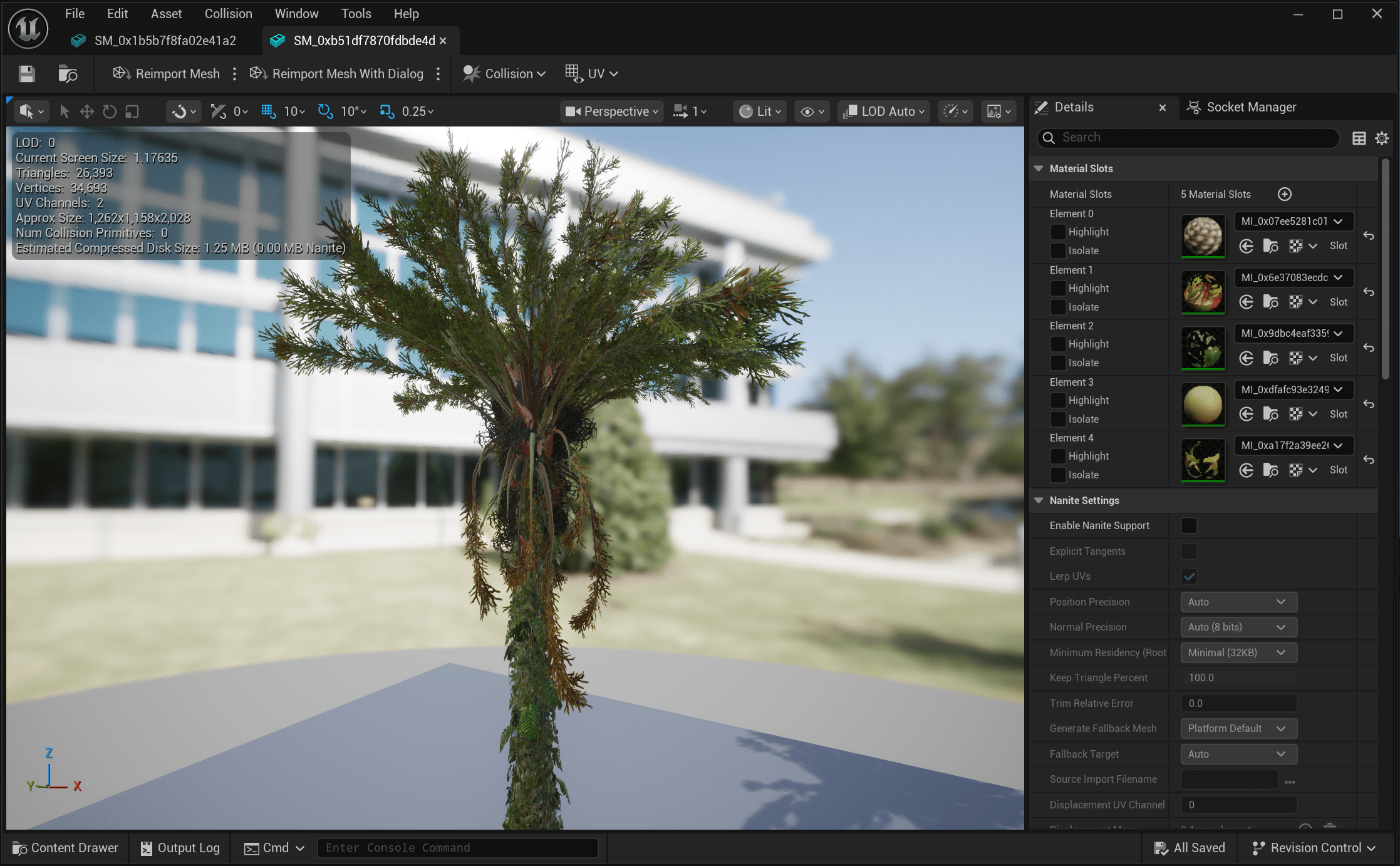
4. The Second Gap: Nested Prefabs — Don’t Recurse, and Content Is Lost
A prefab is “a group of objects packed into a reusable module.” The previous piece listed it as a “reference” — but only at the surface. Hands-on, you find: a prefab can nest another prefab inside it.

Problem: Expand One Level, and the Inner Layer Is Lost
If, while expanding a prefab, you stop the moment you hit “an inner prefab nested inside,” that entire inner branch of content is lost — the scene ends up with inexplicable “holes.”
🟢 Solution = recursive expansion, all the way down. The key is that each level down, the coordinates undergo a composition:
A child object’s world transform = parent transform × child local transform (the rotation part is a per-level quaternion multiplication)
Carry the parent’s transform down level by level, all the way to the leaf objects, and not a single piece of inner content is lost.
🟢 Observed: after adding recursion, the hundreds of expandable prefabs all flattened out, and the child-object total reconciled.
What It Looks Like After Expansion
🟢 Observed (an easily-misread point): after a prefab is expanded, it has no independent asset in the engine — it is fully flattened into individual placement objects within the block, indistinguishable from directly-placed objects. And child objects share the same deduplicated asset library with ordinary objects, reused by asset hash, so identical models aren’t stored twice. Spot-check one block: over two hundred placement objects, all of the same structural form — you can’t tell which came from a prefab and which was placed directly.
On the right below is one block’s object list after expansion — all the same kind of independent placement object, a long flat list with no hierarchy, exactly the “prefab flattened, indistinguishable from direct objects” picture:

One Anomaly to Withdraw
🟡 Inferred: one prefab, after expansion, has dozens of objects all piled at the origin (local transforms all zero). From this “all-zero transform” phenomenon, it’s judged to be not for placement but a “variant-registry”-type container — registering a family of variants together, not meant to be placed on the field. Lay it down mechanically and it’s a clump of clipping geometry. Once identified, it’s skipped — not placed.
That’s exactly the point of this gap: not one level of recursion can be missing, but “expand” doesn’t mean “lay it all down.” Expansion is the means; the judgment of “should this land or not” is what matters.
As for how the runtime engine actually instantiates prefabs — ⚫ black box, outside this piece’s evidence scope, no conclusion drawn.
5. The Third Gap: Volume Boxes — Unnamed Yet Dragged In, “Shouldn’t Be Laid”
The first two gaps were “filling holes” — restoring content named but never expanded. This one is the opposite: “culling” — picking out things that don’t belong on screen yet got into the list.
🟢 Observed: the engine has a class of helper volumes — collision boxes, navigation cutters / volumes, trigger areas, reflection probes, reverb zones, kill volumes, plus various primitive shapes and functional sockets. Their job is to “enclose a region”; they shouldn’t be seen.
The problem: they carry meshes too. In the placement list, they look exactly like real objects. Copy them over and the scene gets a pile of boxes, planes, and cylinders — all clipping.

How to Identify Them: Dual Criteria
A single criterion errs, so use two together:
- 🟢 Criterion ①: node names. These volumes’ render nodes are all “primitive / functional” names (box / plane / cylinder / cutter / volume / trigger / kill…). Key exclusion: anything carrying a real skeleton or collision component is a real object and must not be misjudged. Items with source files are judged directly by node name, covering over two thousand items.
- 🟢 Criterion ②: geometric form. For items with no source file, where the node name can’t be read, look at the bounding box: one axis extremely stretched, and the whole thing scaled up large — most likely a region-enclosing box rather than a concrete model. A full-library per-item geometry rescan, with zero blind spots, recovers these source-less items too.
The Trap: Decal Boxes
🟢 Observed: there’s a kind of box that looks exactly like a volume box, but it’s real content — it projects decals onto the ground (bullet holes / stains / markers), used nearly ten thousand times. Delete it because it “looks like a box,” and ground decals vanish across the map. So it must be explicitly excluded in the cull list, not judged on geometric form alone.
Why Complete It “In One Pass”
🟢 Observed: the early cull list only scanned a small batch, and the boxes it missed came back into the scene. So the approach changed to a full-library per-item rescan, the two criteria merged, the list completed in one pass — the missed boxes went from single digits up to a dozen-plus, spanning primitives, planes, cylinders, functional sockets, and more.
🟢 Key approach: volume boxes are not deleted from the list (deleting would alter the original list structure); instead they’re kept in the list and skipped at assembly per the list. This leaves the original structure intact, and the skip logic stays checkable.
6. Filling All Three: Assemble in One Pass, Without Touching the Old Version
With the three gaps filled, what remains is to actually assemble all blocks into a scene.
🟢 The pipeline (each block runs through it):
- Base list — objects + recursively-expanded prefab child objects (including the restored nested content);
- Overlay vegetation — place each plant back into the block by coordinates, preserving the existing placements from being overwritten;
- Skip volume boxes — skipped at assembly per the list, list structure untouched;
- Land into a new directory — all blocks assembled one by one, split into two batches by “contains terrain or not”; the existing version is untouched (generated into an entirely new directory; the old one is left alone).

Below is one assembled block inside the engine — objects, buildings, and vegetation laid across undulating terrain, one whole rebuildable real scene:

🟢 Observed · reconciliation is the acceptance test: across all blocks assembled, the failure count is 0; the volume boxes that should be skipped — the skip count exactly equals the list, not one missed. Only after sampling a preview of several blocks and confirming them did it scale to the full set.
A reminder of this piece’s discipline once more: every “complete” above is backed by a checkable figure — not “it should be laid down,” but “zero failures, skip counts equal, sampling confirmed.” When pushing “reading it” through to “building it,” that’s the only way to keep from fooling yourself.
7. Two Boundaries: Every Block Can Be Pieced Together; A Whole Planet Cannot
At this point, this piece’s can-do and cannot-do can be drawn clearly.
🟢 Can Piece Together Every Block Correctly
All content within a block — objects, recursed prefabs, vegetation — can be placed back into correct relative positions; material slots, levels of detail, and the volume boxes to cull are all handled.
→ A single block and its content are “observed-rebuildable.” Placement coordinates aren’t encrypted; geometry / materials / levels can all be restored from static data and landed into the engine. And — every “rebuildable” conclusion here is backed by a reconciliation figure, not by “in theory it can.”
⚫ Cannot Piece Together a “Whole Planet”
Transforms inside individual blocks are readable. Per-session block selection and global positions had not been recovered. Missing static records do not establish that those values are stored in encrypted data.
→ Global layout and runtime assembly remain a black box. This follows the same wall as the previous piece: no algorithm reverse-engineered, no network test done — no conclusion, no completion, no assumption about its implementation.
In other words: this piece takes “how a single block pieces together correctly” to the observed level; “how a whole planet forms” stays in the black box — and between them sits the previous piece’s wall.
8. Conclusion
Back to the opening question: once you’ve read a placement list, how do you actually stand a scene up from it?
The answer: fill in, one by one, the three gaps between “reading it” and “building it” — restore what was named but never expanded (vegetation, nested prefabs), cull what was never named yet dragged in (volume boxes), then assemble all blocks in one pass into a new scene that doesn’t break the old version.
🟢 One core conclusion: at the static layer, a scene is made of “reusable assets + a parseable placement list” and can be fully rebuilt block by block; ⚫ but how “a given match’s whole planet” forms remains a runtime black box.
This also answers what the series has been doing all along — not “reverse-engineering a game,” but using one reusable method to make what can be confirmed from static data solid and landed into the engine, while letting the runtime parts honestly stop at the boundary.
9. AI Collaboration Retrospective
This is the series’ standing section: a record of how human and AI actually worked together on this piece, where it went off the rails, and how the human stepped in.
Where AI helped:
- The high-volume mechanical work. Extracting several thousand plants, recursively expanding hundreds of prefabs, a full-library per-item geometry rescan — this “high-volume, clearly-ruled, error-prone” work is AI’s home turf. Writing probes, running batches, reconciling, iterating round after round.
- Chasing root causes down to source level. For the sampler-type-warning trap, the first three rounds were fixing the wrong place; in the end it was reading the engine source’s decision rule line by line that located “the root cause is the default texture’s type, not the sampler setting.” AI has a lot of patience for “grinding through source to locate a root cause.”
Where it went off the rails, and the human’s catch:
- “Material names lie” was caught by a human review. AI initially assigned slots by material name, and the trunk came out wearing the leaf material — AI didn’t catch this error itself; the human looked at the preview screenshot and pointed out on the spot, “this tree’s wrong.” Only then did it trace back to “two export channels contradicting, names unreliable” and switch to the triangle-count fingerprint. Without a human in the loop looking at actual rendered results, this error would have slipped right through.
- The tendency to “lay it all down” needs human constraint. When recursively expanding prefabs, AI tends to “lay every one down mechanically”; that “variant-registry”-type anomaly was judged to be withdrawn from the “all-zero transform” phenomenon — this “expand ≠ lay it all down” judgment needs the human to state the principle explicitly, or AI will place everything indiscriminately.
- The “marked complete” boundary is held by discipline. High-volume work most easily produces “the outer wrapper reports done while the process is actually still running,” “the resume logic skipped a step it never completed” — these false completions. The reason this piece keeps insisting “every completion needs reconciliation data” is precisely that it was taught by this class of pitfall — for AI, “execution finished” and “execution correct” are two different things, and reconciliation must bind the two.
How it got resolved: fixing “the human looks at rendered results” into every iteration round (AI produces a result → human looks at the preview → feedback), stating the “expand/cull judgment principles” up front, and binding every “completion” to a checkable figure. It was this collaboration that actually carried “reading it” through to “building it.”
*All figures are self-drawn infographics (white background, mapping to the text point by point). Every “complete / fix / laid down” in the text is backed by observed reconciliation; wherever ⚫ black box is marked, the algorithm was not reverse-engineered nor the network tested, and no unsupported inference is drawn.*