I. Why This Article
In our previous article, we discussed the methodology of AI Native game development, with the core thesis being “experience validation first” — games can be fully played and validated before production assets are finished.
Methodology sounds great on paper, but what does it actually look like in a real project?
This article answers that with a real case: we had an FPS engine and wanted to transform it into a TPS. Not building a TPS from scratch, but making an existing FPS system “feel like a TPS.”
This isn’t a TPS camera technical article. It’s a record of how AI participated in a real development process — from understanding an unfamiliar system to producing a complete refactoring plan.

II. Starting Point: An FPS Engine Wants to Become TPS
The engine we faced had been in operation for some time — built on UE, substantial codebase, multiple teams had worked on it over the years. It did have a TPP mode — there was a CameraMode component supporting FPP/TPP switching, and the camera did move behind the character when you switched.

But the moment you switched to TPP, you could immediately feel “this isn’t TPS.” Camera distance fixed at 216cm, shoulder offset only 24cm, no follow lag whatsoever — felt like a camera rigidly welded to the character’s back. Aiming switched straight back to FPP, so you couldn’t properly ADS in TPS view. Shooting had almost no camera feedback — recoil and fire shake systems existed but only worked in FPP. Hugging walls caused the camera to clip straight through. Overall it felt more like “watching an FPS from behind” rather than a genuine third-person shooter experience.
The traditional approach is familiar to everyone: designers write a camera requirements doc based on experience, list a bunch of “features to add,” engineering schedules the work, builds it, discovers it’s wrong during integration, revises, re-integrates, revises again. Months later, still tuning basic feel. And because nobody has a full picture of the existing system, there’s a good chance of reinventing wheels — some feature already exists but nobody knows.
That’s how we initially planned to approach it too.
Then we changed our thinking: instead of guessing “what needs to be built” based on experience, let AI read through the entire camera system first and figure out “what already exists.”
III. AI Isn’t “Generating Features” — It’s “Understanding the System”
This was the most surprising part of the entire process.
After AI read through the complete camera system source code, we discovered an unexpected truth: this engine’s camera framework was actually very capable.
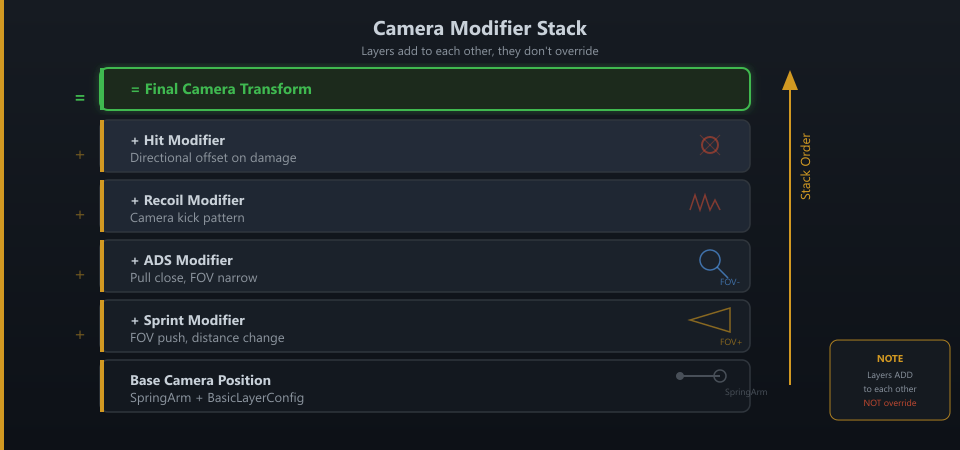
The SpringArm component supported 15+ movement states — standing, crouching, prone, vaulting, parachuting, swimming, being carried, NPC dialogue… each with independent camera distance, offset, and height configurations, driven through a TMap called BasicLayerConfig configured in Blueprints — completely data-driven. The CameraModifier system lined up impressively: weapon recoil modifier, gun sway modifier, hit camera modifier, fire shake modifier, prone impact modifier, vehicle camera modifier… over a dozen modifiers each handling their own responsibility. The scope system had a complete CSV config table with 50+ scopes, each with its own zoom ratio, FOV, and depth-of-field parameters. FPP/TPP switching had a complete priority mechanism supporting multiple systems requesting camera mode changes simultaneously with priority arbitration.
Framework capabilities far exceeded our expectations.
But AI also uncovered another side. Having AI dig through a years-old production codebase is a lot like archaeology — you keep excavating things, some still in use, some buried, some half-finished and abandoned.

Sprint camera layer — complete acceleration/stabilization/deceleration camera change logic, roughly 60 lines of code, but entirely wrapped in #if 0. This wasn’t “never built.” It was built, then abandoned.
Recoil system — highly refined, supporting per-stance recoil patterns with spring-damper recovery. But detecting non-FPP mode triggers an immediate return. Whether an engine “feels like TPS” sometimes comes down to a single line of code.
ADS aiming — triggers forced FPP switch with no configuration toggle. TPS experience breaks apart not because systems are missing, but because systems aren’t truly cooperating.
The code also contained large blocks annotated “deprecated logic” — left/right shoulder shooting camera layers, jetpack camera layers, all with configuration property declarations but commented out. A previous team had planned a complete TPS shoulder-shooting camera system, but it was shelved at some point. These ruins mixed in with active code — a production engine that’s been running for years often doesn’t look like “one system.” It looks more like ruins from multiple eras stacked on top of each other. Without AI flagging them, it’s very hard to distinguish what’s alive from what’s dead.
AI traced the call chains further down and dug up some even more unexpected things.
FPP/TPP transition timing was asymmetric — switching into FPP took 0.1 seconds (instant snap), switching back to TPP took 0.6 seconds (smooth transition), with independent easing curves for each direction. These weren’t arbitrary numbers: fast zoom-out looks jarring, so entering FPP needs to be fast while returning to TPP needs to be slow. An experience design decision embedded in code, with no documentation recording why. When AI found these numbers, we realized previous developers had put very careful thought into this.
The camera mode system had 7 priority levels. Interestingly, player manual FPP/TPP switching ranked 5th — above vehicles. Code comments explicitly stated: “Player manual switch has very high priority. If gameplay logic needs to override it, it must first call the cleanup interface.” A UX philosophy embedded in code: player choice trumps most system behaviors.
The most unexpected discovery: AI traced the retarget logic and found that even when the player was in TPP mode, if the weapon was zoomed in, animations would silently switch to FPP mode. When aiming down sights in TPP, the character’s arm animations were actually using FPP ones. Without reading the complete chain, you’d never find this.
An engine that doesn’t “feel like TPS” isn’t because it lacks TPS capabilities — it’s because those capabilities are scattered everywhere, some disabled, some FPP-only, some with logic written but no parameters configured, some half-built and shelved, some hidden in conditional branches you’d never notice.
We initially thought “we need to build many new features.” We later discovered “most features already exist — they just weren’t being used properly.”
This discovery changed the entire project trajectory. Under traditional thinking, we would have planned a “develop new TPS camera system” project taking months. What actually needed to happen was “enable existing features + tune parameters + fix a few hardcoded blocks” — an order of magnitude less work.
Even more interesting, AI mapped out a complete configuration hierarchy: the base layer is BasicLayerConfig controlling per-stance camera parameters, the middle layer is IndoorLayerConfig automatically applying additive offsets indoors (doing an upward ray trace every 0.5 seconds to detect ceilings), and the top layer is the scope table controlling ADS FOV and depth of field. Many “camera feels wrong” problems might not need code changes at all — just table tuning. But before AI’s analysis, nobody knew the full picture of this three-layer configuration system, let alone the data flow between them.
This made us rethink a question: in traditional projects, the time teams spend “developing new features” may not be as much as imagined. A huge amount of time is actually spent “figuring out what state the existing system is actually in.” In a medium-to-large codebase, who wrote some feature, who disabled it, why it was disabled, whether it can still be used, which table the parameters are in — these questions can take days to weeks through manual code review. AI compressed this process to a few hours.
And AI’s “understanding” isn’t simple code search. It can string together logic scattered across a dozen files into a complete chain: player presses aim → FSM Action triggers → CameraMode component arbitrates by priority → SpringArm state switches → BasicLayerConfig looks up corresponding parameters → interpolates to target position → CameraModifiers stack recoil/sway/hit effects one by one → final camera transform output. This chain spans Gameplay Framework, Camera, Weapon, and Animation — four modules. No human can trace this end-to-end in their head at once. AI can.
IV. From Feature List to Design Principles — Every Principle Comes From a Real Pitfall
After understanding the system’s current state, the first draft naturally became a Feature List: ADS should stay TPP, add Sprint camera, enable peek, complete TPP shooting feedback, optimize collision…
A long list.
Then we hit a problem: with so many features listed, we didn’t know what to prioritize, what to restrain versus amplify, or whose rules win when two features conflict.
What the Feature List lacked wasn’t “what to do” but “why to do it” and “what not to do.”
So we started building design principles. Not by sitting down to write a complete Camera Philosophy from scratch — nobody reads those. Instead, every time we hit a pitfall, we distilled the lesson into a principle. Five principles, each from a real problem.
Camera Philosophy: Readability > Feel > Cinematic > Flashy
We initially tried adding dynamic camera movements for a “premium feel.” Heavy follow inertia, aggressive Sprint FOV push, strong hit screen offset. It definitely looked more “dynamic.”
Then we discovered players couldn’t hit anything.
Comfort & Stability: No Fatigue Over Long Sessions, ADS Must Be Stable
We tried stronger Camera Lag and Sprint Shake. The first problem wasn’t “not exciting enough” — players started getting dizzy.
Short-term reaction: “Wow, this camera has such a cinematic feel.” After 30 minutes: “I need a break.” TPS is a genre for long play sessions. Camera comfort matters far more than short-term excitement.

Transition & Rhythm: State Transitions Need Tempo
Every camera feature worked fine in isolation. But running simultaneously, Sprint pull-back hadn’t recovered before ADS kicked in, ADS was still transitioning when recoil fired, recoil hadn’t settled when an explosion hit.
The problem wasn’t that any single feature was wrong — the camera had lost its rhythm.
Consistency: Same Action, Same Feedback, Every Time
ADS shooting feedback didn’t match hip-fire feedback. Sprint pull-back distance varied. ADS transition speed was inconsistent.
Result: players could never build stable muscle memory.
Safety Rules: Camera Must Never Break
Narrow spaces causing camera to shake wildly. ADS getting forcibly pulled open by explosion effects. Wall-hugging causing camera to clip through the character. These aren’t “bad experience” problems — they’re “experience completely collapses” problems.

V. Separating Function from Feel — AI Exhausts Possibilities, Humans Decide What’s Right
Halfway through the plan, we discovered a more fundamental issue: much of camera experience quality depends not on “whether a feature exists” but on “whether parameters are right.”
The same Sprint Camera feature — pushing FOV 2 degrees more or less, pulling the camera back 30cm versus 50cm — feels completely different. Getting the feature right is just the starting point; getting the parameters right is the finish line.
But feature development and parameter tuning require completely different skills. Feature development needs code architecture understanding, logic changes, edge case handling; parameter tuning needs repeatedly playing the game, judging by feel, making tradeoffs. AI does the former quickly and reliably; only humans can do the latter.
So we split the workflow into two tracks:
AI handles making features work — analyzing code, enabling disabled features, filling missing logic paths, generating parameter table templates with suggested defaults.
Designers handle making the experience feel right — taking AI-generated parameter tables, repeatedly playing and testing, adjusting item by item until the feel is correct.
More precisely: AI is better at “exhausting possibilities,” humans are better at “deciding what’s right.” AI can tell you “this engine has 15 camera states, 8 types of Camera Modifiers, 50+ scope configurations,” but only a human can judge “how far the camera should be from the character when standing to feel most comfortable.”
This isn’t AI’s limitation — it’s the right division of labor.
For a concrete example: after analyzing the shooting feedback system, AI told us “among the dozen-plus CameraModifiers, recoil, fire shake, and FPP bone animation only work in FPP; gun sway and joggle camera work in both FPP and TPP; hit camera works in TPP but is weak due to bone animation dependency.” Based on this analysis, AI generated a TPP recoil parameter table template categorized by weapon type. But “does scaling rifle recoil to 0.5 of FPP feel right” and “will SMG’s high-frequency shake annoy players” — these judgments only come from someone playing a few rounds with a controller.
AI continuously outputs “what the system can do” and “how parameters can be tuned”; designers continuously answer “does this feel right” in-game. Two tracks running in parallel, much faster than traditional sequential feedback loops.

VI. Development Plan: First “Does It Look Like TPS,” Then “Can You Aim,” Finally “Does Shooting Feel Good”
With plan and principles in hand, the next question was: what to do first?
The biggest problem with TPS cameras usually isn’t “missing features” but “foundation rhythm isn’t established.” If the basic viewing angle is wrong, adding more advanced features is building on a crooked foundation.
We broke P0 into 7 steps in strict sequence:
Step one was basic TPP view and shoulder position. This step only answers one question: “Does it look like a TPS?” If shoulder offset is wrong or camera distance feels awkward, everything downstream will be off.
Step two was ADS. Establishing stable aiming experience. This was the highest-risk step — affecting input, FOV, recoil, aim stability — everything interconnected. Placed at step two to surface problems early.
Step three was collision handling. Steps four through seven: shooting feedback, Sprint camera, shoulder switch, hit feedback.
Each step validated immediately before proceeding to the next.
Why does this order matter? Because TPS camera dependencies are directional. Wrong base view means ADS pull-in targets the wrong position; unstable ADS means shooting feedback can’t be tuned; unresolved collision means all indoor features break. Each subsequent step depends on previous steps being correct.
We also risk-rated each step. ADS overhaul was high risk — it touches input, FOV, recoil, aim stability; changing one thing might affect five others. Sprint Camera and peek were low risk — existing logic just needs uncommenting.
One core principle throughout: unless it affects core experience, prioritize reusing existing capabilities over large-scale refactoring.
After P0 completion, lock the foundation. P1 (advanced feel) and P2 (advanced combat presentation) must not break P0’s established baseline.

VII. AI’s Real Value — Compressing the Cost of “Understanding Current State”
Looking back at the entire process, AI didn’t automatically produce a TPS camera.
What AI did was compress “understanding current state → identifying problems → producing plans → breaking down tasks” from weeks to days.
In this project, AI began to resemble a senior engineer on the team for the first time — not because it writes code, but because it can rapidly understand the entire system.
AI read the complete camera system source code in hours, telling us: what exists here, what’s missing there, what got disabled by whom, what the config tables look like, how the data flows. Then based on these facts (not guesses), produced plans and schedules.
Traditional flow is “guess first, verify later” — guess what needs building based on experience, verify after development whether the guess was right. AI Native flow is “look first, build later” — let AI read through the system first, produce plans based on facts, then develop with targeted precision.
This connects back to the previous article’s core thesis, but at a different dimension. The previous article’s “experience validation first” mainly meant validating gameplay direction with placeholder assets. This practice made us realize: validation first isn’t just validating gameplay — it includes validating “what the existing system can actually do.” Understanding what cards you hold before making moves is itself a form of validation first.
There was an unexpected bonus. AI produced not just a plan, but a “system map” the entire team could understand. Previously only the original code authors knew what the camera system looked like. Now AI organized the complete architecture, data flows, config tables, active features, and disabled features into documentation. New engineers and designers joining could get up to speed by reading this document instead of spending two weeks reviewing code themselves.
This may be an undervalued contribution of AI in large-scale engineering: not just helping you do things, but helping you turn tacit knowledge into explicit knowledge. In many codebases, the greatest asset isn’t the code itself but the contextual information of “why it was written this way” and “what it can do.” This information previously existed only in a few people’s heads. AI makes it documentation everyone can reference.
VIII. This Is Just the Beginning
Camera is only the first step of TPS transformation.
We’ll continue dismantling movement systems, TPS aiming, animation layering, and weapon mounting module by module. Not just presenting “final solutions,” but genuinely recording how AI participates in the continuous refactoring of a large game engine.
Many problems are honestly still far from solved. AI can help teams understand systems faster, validate directions faster, and prototype faster. But “what makes a good experience” still requires humans to repeatedly test and stumble. Camera feel, shooting rhythm, movement weight — no AI can judge these for you. Only someone holding a controller and playing for dozens of hours can gradually approach the answers.
To date, AI’s greatest value remains not “automatically generating games,” but enabling teams to understand systems faster, validate directions faster, and discover what isn’t fun faster.
AI exhausts possibilities; humans decide what’s right. AI understands systems; humans understand experience.
This is an ongoing AI Native development record, not an isolated case study. If you also have an engine that “clearly has capabilities but doesn’t feel right when running,” try letting AI read through it first. You might discover, as we did: the answers may already be in the code — it’s just that nobody had ever looked at the complete picture.


